Drafting OKRs from Jira, GitHub and your HR system with AI
How OKR.ai uses MCP to turn real projects and teams into a first draft worth editing.
By the OKR.ai team··6 min read
Ask a general-purpose chatbot to “write OKRs for my engineering team” and you’ll get something that sounds right and fits no team in particular: “Improve code quality”, “Increase velocity by 20%”. The model has no idea what your team is building, who’s on it, or what last quarter looked like. OKR.ai fixes that by reading the tools where that information already lives, over the Model Context Protocol, before it drafts a word.
Key takeaways
Generic AI OKRs are generic because the model lacks context: your projects, people and numbers.
MCP is an open standard for connecting AI applications to tools like Jira, GitHub, Linear, Notion and HR systems.
OKR.ai reads connected tools read-only, turns them into compact context stored in your own database, and grounds drafts in real names and baselines.
AI drafts, you decide. Every suggestion is validated and shown for editing before anything is saved.
Good OKRs are specific. They name the product area, the customer segment and the metric, and they start from a real baseline. A language model can write in that shape, but without your data it has to invent the specifics, or leave them vague. The output looks like an OKR and can’t be acted on.
The information a good first draft needs already exists, scattered across your tools:
Project trackers (Jira, Linear, Asana, monday.com) know what each team is building: epics, milestones and their status.
Engineering tools (GitHub, GitLab, Sentry) know about delivery and quality.
Incident tools (PagerDuty, Opsgenie, ServiceNow) know about reliability.
HR systems (Workday, BambooHR, HiBob, Rippling, Personio, Deel) know who’s on each team and who reports to whom.
Docs (Notion, Confluence, Google Drive, a handbook site) often hold the strategy itself.
The Model Context Protocol (MCP) is an open standard, introduced by Anthropic in late 2024, for connecting AI applications to external tools and data. A tool exposes an MCP server; an AI application connects to it as a client and can read its resources or call its tools. Many vendors now publish hosted MCP servers, so connecting is often just a URL and a sign-in.
For an OKR tool, MCP means one well-defined way to read context from dozens of systems, instead of a custom integration for each one.
From tools to a draft. OKR.ai’s MCP client reads your tools read-only, stores the context in your own database, and the AI model you choose drafts OKRs for you to review.
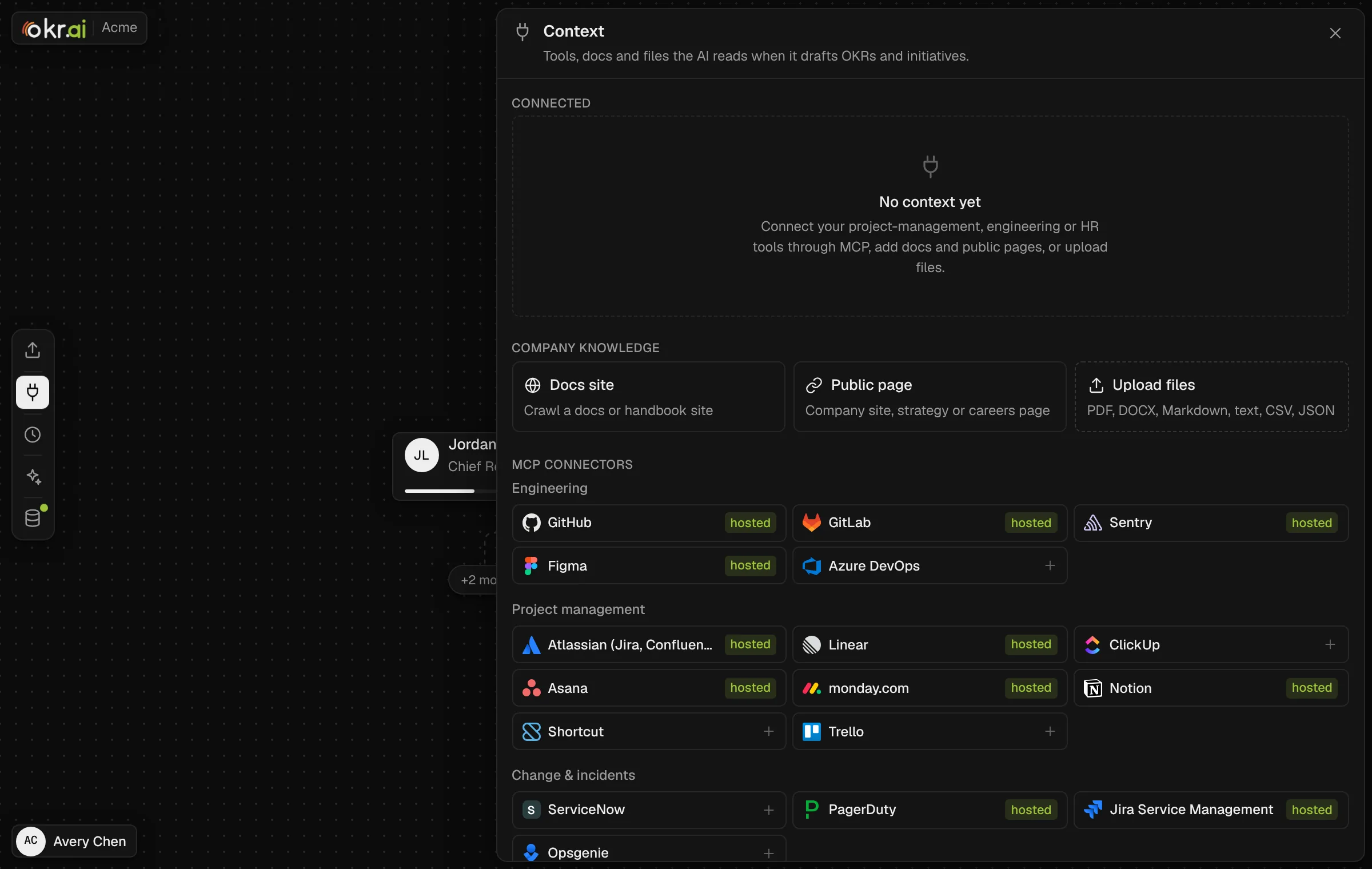
Open Context in OKR.ai and pick a connector. Presets cover engineering, project management, incident and HR tools, with hosted endpoints pre-filled where the vendor publishes one. For a tool without a hosted server, paste the URL of the MCP server your team runs.
Sign in with OAuth or a token. OAuth follows the MCP authorization spec with PKCE. Tokens are encrypted at rest, refreshed automatically and sent only to that server.
Read-only by design. The client reads resources and calls only read-only, argument-free tools. It prioritises what matters for OKRs: goals, projects and epics, teams and people, then issues and tickets.
Compact and cached in your database. Output is converted to compact markdown, stored on the source in the workspace’s own database, and refreshed daily, or on demand.
Beyond MCP. Crawl a docs or handbook site, add a public strategy or careers page, or upload PDFs, DOCX, Markdown, CSV and JSON.
The Context panel. Connect tools over MCP, crawl a docs site, add public pages or upload files. Hosted endpoints are pre-filled where the vendor publishes one.
Once sources are connected, context flows into every AI feature:
From context. In My OKRs, AI reads your sources and drafts your OKRs and, when the sources show your team, your team’s OKRs too. Your drafts wait for you to acknowledge; your team’s are proposed to them like a push.
Existing OKRs first. If your docs already contain written OKRs, they’re shown as written. AI only rewrites them when you click Improve with AI.
People from your HR system. People in your sources who aren’t in OKR.ai yet are offered, and added only if you tick them.
Suggest progress. On any key result, Suggest from context estimates the current value from ticket and project status or incidents, and pre-fills the progress form for you to check.
Pull, push and initiatives. Aligning to your manager, splitting OKRs across reports and drafting initiatives all use connected context automatically.
HR: 3 teams (Platform, Core, Growth), 18 engineers
Manager’s OKR: “Become the default choice for mid-market teams”
What AI drafts
O: Ship the platform mid-market buyers need
KR: Mid-market deals blocked on SSO/SCIM from 9 to 0 (Core)
KR: p95 dashboard load from 1.8 s to 1.2 s (Growth)
O: Make reliability a feature
KR: Sev-1 incidents from 6 to ≤2 (Platform)
The draft uses the real epic names, the incident count as a baseline, the actual team structure, and it aligns to the manager’s objective. You still decide whether 1.2 seconds is the right target.
Context is data, never instructions. Text in a ticket or a doc can’t change the AI’s rules or task.
Validated output. Every AI answer is checked against a schema, and every id it returns is checked against OKRs you’re allowed to see, before anything is written.
Nothing saved without you. Suggestions are always shown for editing first, and every change still goes through acknowledge and approve.
No surprise crawling. Docs and page crawls run behind an SSRF guard that blocks private-network hosts unless an admin allows them.
Your model, your key. Choose Claude, OpenAI, DeepSeek or any model on OpenRouter. Prompts go only to the provider you configure, never to the OKR.ai project.
The coaching rules the AI follows, covering how to write OKRs, scope by seniority and split targets so they add up, live in a single plain-text file that ships with every install. They encode the same principles as how to write good OKRs and key results that add up.
OKR.ai runs every AI flow with a deterministic stand-in model when OKRAI_MOCK_LLM=1 is set, so you can explore the whole workflow before choosing a provider. Get started in about five minutes, then read the MCP & context docs to connect your first tool.
AI can write a strong first draft when it has context: your strategy, projects, people and baselines. A person should still choose the targets and approve the result. OKR.ai is built that way.
Does OKR.ai write anything back to Jira or GitHub?
No. The MCP client is read-only. It reads resources and calls only read-only, argument-free tools.
Where is the context stored?
In the workspace’s own database, alongside its OKRs. It’s refreshed daily and on demand.
Which AI models can I use?
Claude, OpenAI, DeepSeek, or any model on OpenRouter with your own key. Admins choose in the AI model panel, and keys are encrypted at rest.
What if a tool has no hosted MCP server?
Paste the URL of an MCP server your team runs for it, or use a docs crawl, a public page or file uploads instead.