What a goal-setting tool knows about a company, and why that data belongs on your own servers.
By the OKR.ai team··5 min read
An OKR tool looks harmless: some goals, some percentages, a few progress bars. But spend a quarter inside one and it holds a remarkably complete picture of a company: what it’s trying to win, how it’s organised, which teams are behind, and what launches next. That’s why we built OKR.ai to run on your own servers, and why the code is open for anyone to read.
Key takeaways
An OKR tool stores strategy, org structure, targets and team performance, some of the most sensitive data a company has.
Putting it with a SaaS vendor usually triggers a vendor risk assessment, a DPA and a data-residency check.
Self-hosted, the data stays in infrastructure you’ve already approved, in the region you choose.
Open source means your security team can read every line, and there’s no vendor lock-in.
The trade-off is that you run it. OKR.ai keeps that small: npx okr-ai, a database you already have, and seven runtime dependencies.
List what ends up in a goal-setting tool after one quarter and it reads like a board pack:
A board pack in disguise. After a quarter, an OKR tool holds your strategy, org structure, targets, unreleased roadmap and a running record of which teams are behind.
Strategy. The handful of outcomes leadership has decided matter most this year, in its own words.
Org structure. Every person, their manager, their role and often their job description.
Financial targets. Revenue, pipeline, burn and hiring plans, with baselines.
Roadmap. Launches and features, often months before they’re announced.
Performance signal. Week-by-week progress, confidence and blockers for every team.
Connected sources. With AI drafting from your tools, summaries of projects, tickets and incidents too.
In a competitor’s hands, that’s a playbook. In a breach, it’s a disclosure. Most companies wouldn’t email it to a stranger, yet they routinely store it with one.
In a company of any size, buying a SaaS tool that stores this kind of data usually triggers:
a vendor risk assessment and a security questionnaire;
a review of the vendor’s SOC 2 or ISO 27001 report;
a data processing agreement and a new entry in your sub-processor list;
a data-residency check against the vendor’s hosting regions.
Each step is reasonable on its own. Together they add weeks, sometimes months, between “let’s try OKRs” and the first team using them, and they repeat at renewal.
Where the data goes. With a SaaS tool, OKR data leaves your network for the vendor’s cloud. Self-hosted, it stays in infrastructure and regions you’ve already approved.
With OKR.ai self-hosted, the project never receives your data, so there’s no hosted vendor to assess. Specifically:
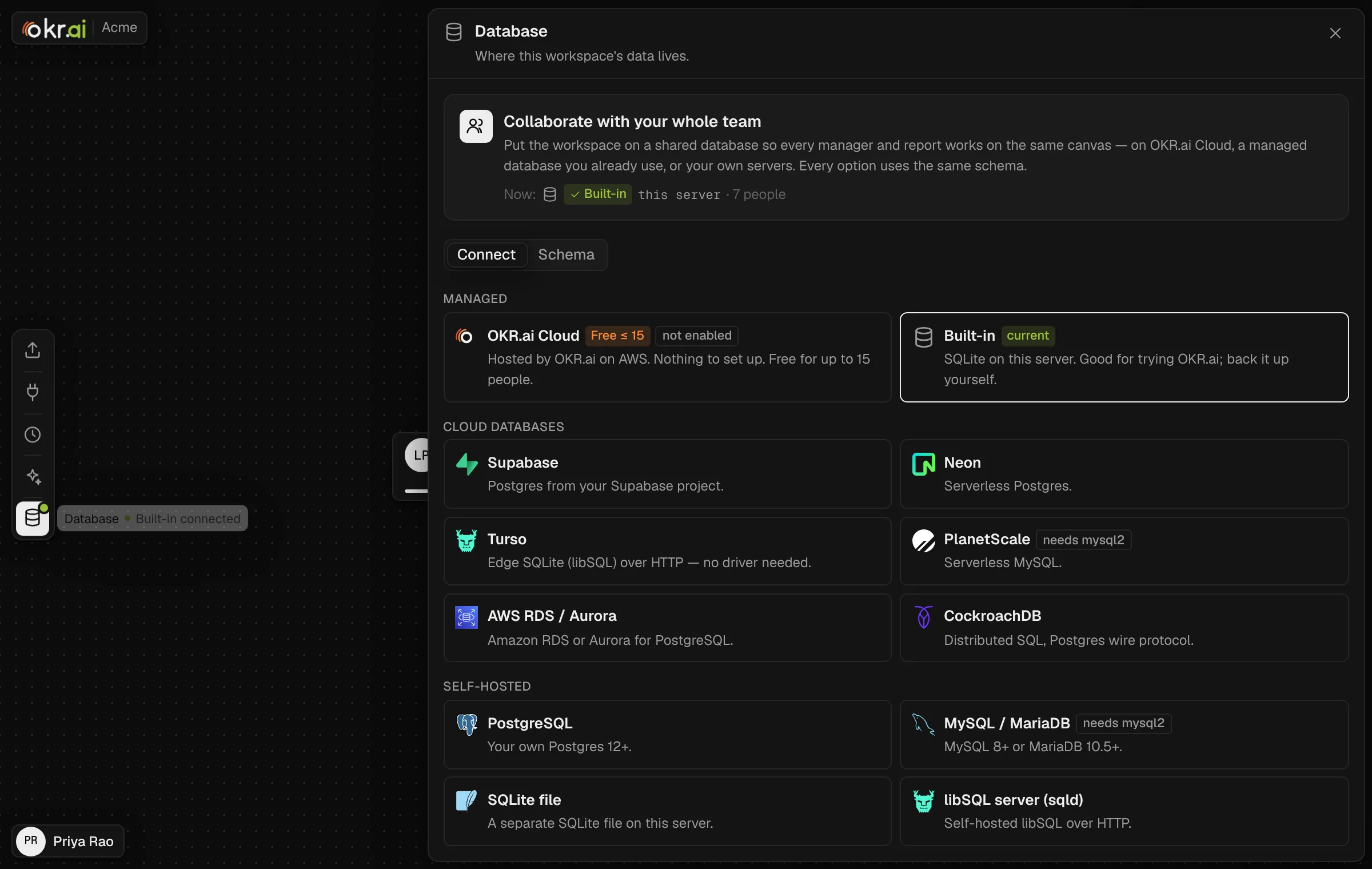
Your database. Data lives in a database you already run: built-in SQLite to start, or PostgreSQL, Supabase, Neon, AWS RDS, CockroachDB, Turso, MySQL and others. Workspaces can switch backends later and copy their data across.
Your region. You decide where it runs, so data residency is a deployment choice rather than a contract negotiation.
Your identity provider. Sign in with email codes, Google, or OIDC single sign-on through Okta, Entra ID, Google Workspace, Auth0 or Keycloak.
Your AI key. AI is optional. When it runs, prompts go to the provider you choose (Claude, OpenAI, DeepSeek or a model on OpenRouter) under your agreement with them. Nothing goes to the OKR.ai project.
Self-hosting doesn’t make you compliant by itself; you still operate the service. But it turns a vendor review into a deployment review of infrastructure your security team already understands. More detail is in security & compliance.
Pick where the data lives. Each workspace chooses its database: the built-in store, a managed cloud database you already use, or your own servers. Every option uses the same schema.
Self-hosting a closed-source binary still asks you to trust what you can’t see. OKR.ai is MIT-licensed, which means:
Reviewable. Your security team can read the code that touches your data, including exactly what is sent to an AI provider.
A short dependency list. Seven runtime packages: Next.js, React, React DOM, Zod, pg, and the official OpenAI and Anthropic SDKs. Sign-in, sessions, SMTP, CSV parsing and the MCP client are written on Node built-ins.
No lock-in. If the project disappeared tomorrow, your data would still be in your database, in documented tables prefixed okr_, and the code would still run.
Inspectable AI. The coaching rules the AI follows are a plain-text file that ships with every install, so you can read exactly how it reasons.
Need-to-know visibility. Full OKRs, progress and evidence are visible only to the owner, their manager and their direct reports. Further away, people see objectives and key results only. This is enforced on the server for every request.
Encrypted secrets. Database connection strings, AI keys, MCP tokens and SSO secrets are encrypted at rest and never sent back to the browser.
Hardened requests. Signed HttpOnly sessions, CSRF tokens and same-origin checks on every call, and PKCE for OIDC.
Careful AI. Every AI answer is schema-validated and checked against what the user is allowed to see before anything is written. Connected content is treated as data, never as instructions.
Self-hosting means you run it: upgrades, backups and uptime are yours. We’ve tried to keep that cost small:
One command to try it.npx okr-ai starts a working instance on Node.js 22.13+ with a built-in SQLite database.
Boring production. A Node process behind your usual reverse proxy, a process manager or Docker, and a database you already back up. See self-hosting in production.
A managed option when you want one. OKR.ai Cloud can host the database for teams that would rather not run one. Its AWS stack is in the repository, so you can also deploy it to your own AWS account.
Self-hosted OKR.ai is $0, with every feature and unlimited people. AI usage is billed by your own provider at their rates, with no markup. There’s no per-seat licence to negotiate and nothing to renew.
Yes. OKR.ai is MIT-licensed and free to self-host with every feature and unlimited people. You can run it with npx okr-ai or from source.
Can I run OKR.ai on-premise?
Yes. OKR.ai runs anywhere Node.js 22.13+ runs, with a database on your own network, and it never needs to call the OKR.ai project. AI features need network access to the model provider you configure, and MCP connectors to the tools they read.
Does OKR.ai send any data to the OKR.ai project?
No. A self-hosted deployment never sends your OKR data to the project. If you enable AI, prompts go only to the provider you configure.
Which databases does it support?
Built-in SQLite, PostgreSQL, Supabase, Neon, AWS RDS and Aurora, CockroachDB, Turso, libSQL, a separate SQLite file, MySQL, MariaDB and PlanetScale. See the databases docs.